Elevating Accessibility
As a hospital, MSK had an excellent grasp of how to ensure physical access for all, but our tech and product teams needed a better understanding of all aspects of digital accessibility. So, I teamed up with our front-end designers and developers to change that.
The Problem
We identified a fundamental knowledge gap regarding digital accessibility. Employees across technical product teams didn't grasp the range of disabled populations we needed to serve or how our individual roles contributed to ensuring accessibility for all.
The Plan
We pulled together a small, focused team to conduct research. We dug into the latest AA/AAA standards, reviewed our site for example issues, and talked with employees to gauge their accessibility knowledge. We used our findings to sketch out a digital accessibility learning hub that all employees could access.
The Process
We built a repository in GitHub and started with a long list of topics we needed to address.
I suggested an initial content architecture and finalized it with our Principal, and then we all got to work building out the pages.
I wrote and edited copy, tested and documented processes, and refined the architecture as the content necessitated. We tested, gave each other feedback, iterated, and tested more.
The Result
We launched a comprehensive learning hub that first walked employees through the basics of digital accessibility: who it was for, why it was important, and how they were responsible for maintaining standards. Team members then practiced auditing the site and learned how every element of a page or product can impact accessibility. To support streamlined development, we also built a comprehensive suite of disability-friendly components.
Walkthrough

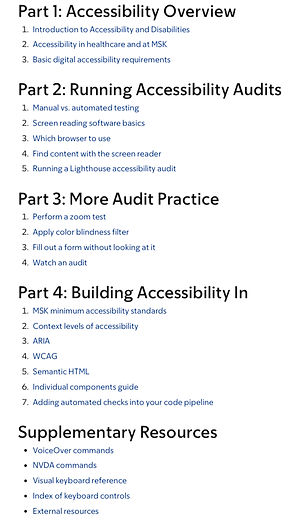
Introduction and site structure
The landing page quickly describes the purpose of the guide and recommends how employees should walk through it. Unless a user bookmarked a specific page, they would always land here first, so we laid out the entire page structure here. This allowed repeat users to get where they needed to go in one click, as opposed to using the left nav dropdowns.

Connecting the individual to the problem
As mentioned above, many of our colleagues, particularly those on the periphery of actual design and code work, needed a better grasp of two main ideas: that "disability" had a broader definition than most people realized, and that everyone at MSK shared responsibility for improving our digital accessibility.


Running audits
You can tell someone all about the navigation hardships people with disabilities go through, but nothing replaces the experience of auditing a page or an app with the tools the disabled need to use. To bring our colleagues into that world, we clarified the need for manual testing, then gave them several basic auditing tasks so they could experience navigating our site from a disabled perspective.


Tools to build in better accessibility
Once our colleagues had a better understanding of how to evaluate a page, they were ready to start incorporating accessible features into designs and builds--and we were there to help! Each of us on the team provided tools, tips, and/or code specific to our areas of expertise. For example, I provided the text explaining how to better write image alt text, attributes, and figcaptions for screen readers.


